[av_tab_section initial=’1′ tab_pos=’av-tab-above-content’ content_height=’av-tab-content-auto’ tab_arrows=” tab_padding=’default’ padding=’default’ bg_color=” color=” transition=’av-tab-no-transition’ id=” custom_class=” template_class=” aria_label=” av_element_hidden_in_editor=’0′ av_admin_tab_active=’1′ av_uid=’av-l1v61zwb’ sc_version=’1.0′]
[av_tab_sub_section tab_title=’1.如何註冊’ icon_select=’image_top’ icon=’ue832′ font=’entypo-fontello’ tab_image=’1363′ tab_image_style=” vertical_align=’top’ color=” background_color=” src=” attachment=” attachment_size=” background_attachment=’scroll’ background_position=’top left’ background_repeat=’no-repeat’ custom_class=” template_class=” av_uid=’av-l1v610ff’ sc_version=’1.0′]
[av_video src=’https://t6s.net/wp-content/uploads/2024/05/2024051110530866.mp4′ mobile_image=” attachment=” attachment_size=” format=’16-9′ width=’16’ height=’9′ conditional_play=” id=” custom_class=” template_class=” av_uid=’av-lw1zn0bf’ sc_version=’1.0′]
[/av_tab_sub_section][av_tab_sub_section tab_title=’2.登入遊戲’ icon_select=’image_top’ icon=’ue832′ font=’entypo-fontello’ tab_image=’1364′ tab_image_style=” vertical_align=’middle’ color=” background_color=” src=” attachment=” attachment_size=” background_attachment=’scroll’ background_position=’top left’ background_repeat=’no-repeat’ custom_class=” template_class=” av_uid=’av-l1v64ipw’ sc_version=’1.0′]
[av_image src=’https://t6s.net/wp-content/uploads/2024/05/2024051110201062.png’ attachment=’2525′ attachment_size=’full’ copyright=” caption=” image_size=” styling=” align=’center’ font_size=” overlay_opacity=’0.4′ overlay_color=’#000000′ overlay_text_color=’#ffffff’ animation=’no-animation’ hover=” appearance=” link=” target=” title_attr=” alt_attr=” img_scrset=” lazy_loading=’disabled’ av-mini-hide=’aviaTBav-mini-hide’ id=” custom_class=” template_class=” av_element_hidden_in_editor=’0′ av_uid=’av-l1v6wqf6′ sc_version=’1.0′ admin_preview_bg=”][/av_image]
[av_image src=’https://t6s.net/wp-content/uploads/2024/05/2024051110203262.png’ attachment=’2526′ attachment_size=’full’ copyright=” caption=” image_size=” styling=” align=’center’ font_size=” overlay_opacity=’0.4′ overlay_color=’#000000′ overlay_text_color=’#ffffff’ animation=’no-animation’ hover=” appearance=” link=” target=” title_attr=” alt_attr=” img_scrset=” lazy_loading=’disabled’ av-desktop-hide=’aviaTBav-desktop-hide’ av-medium-hide=’aviaTBav-medium-hide’ av-small-hide=’aviaTBav-small-hide’ id=” custom_class=” template_class=” av_element_hidden_in_editor=’0′ av_uid=’av-l1v6x3bb’ sc_version=’1.0′ admin_preview_bg=”][/av_image]
[/av_tab_sub_section][av_tab_sub_section tab_title=’3.快速存款’ icon_select=’image_top’ icon=’ue832′ font=’entypo-fontello’ tab_image=’1365′ tab_image_style=” vertical_align=’middle’ color=” background_color=” src=” attachment=” attachment_size=” background_attachment=’scroll’ background_position=’top left’ background_repeat=’no-repeat’ custom_class=” template_class=” av_uid=’av-l1v650sq’ sc_version=’1.0′]
[av_textblock textblock_styling_align=” textblock_styling=” textblock_styling_gap=” textblock_styling_mobile=” size=” av-medium-font-size=” av-small-font-size=” av-mini-font-size=” font_color=” color=” av-mini-hide=’aviaTBav-mini-hide’ id=” custom_class=” template_class=” av_uid=’av-lw1xqnyg’ sc_version=’1.0′ admin_preview_bg=”]
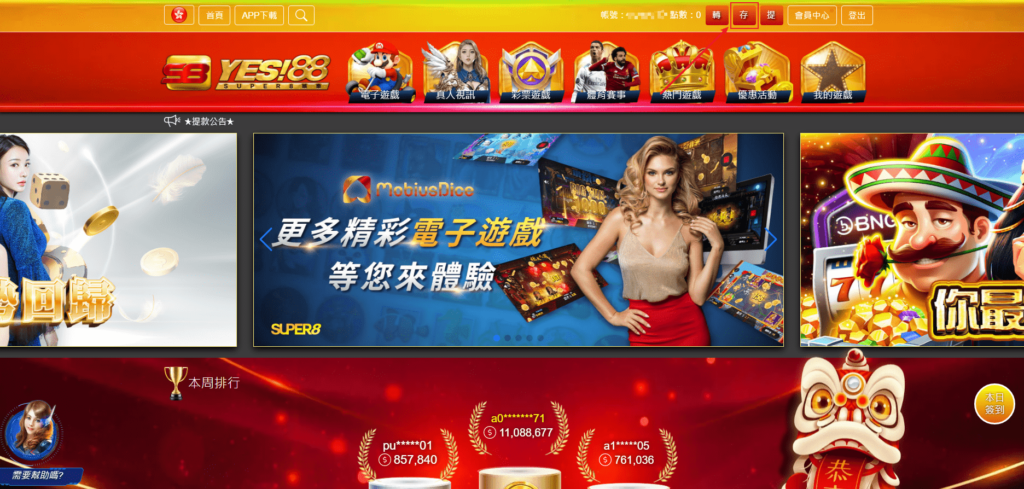
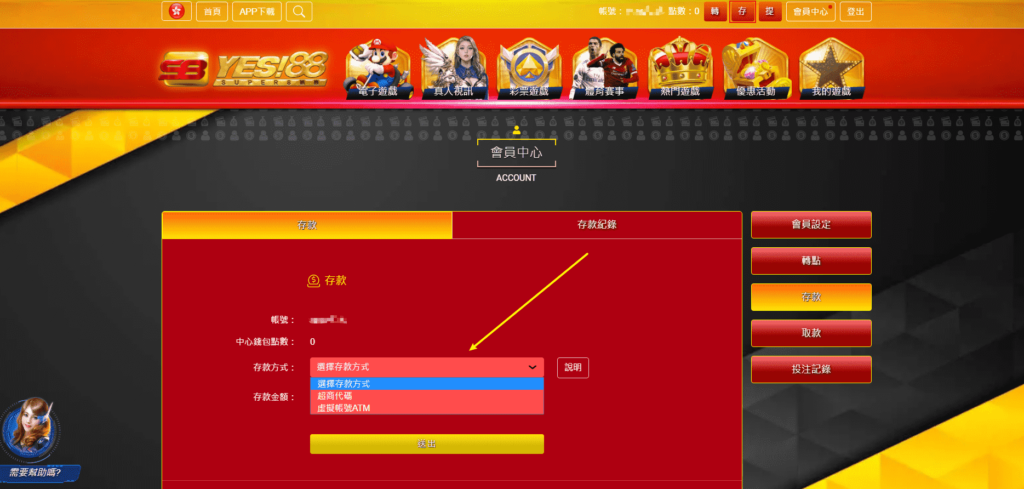
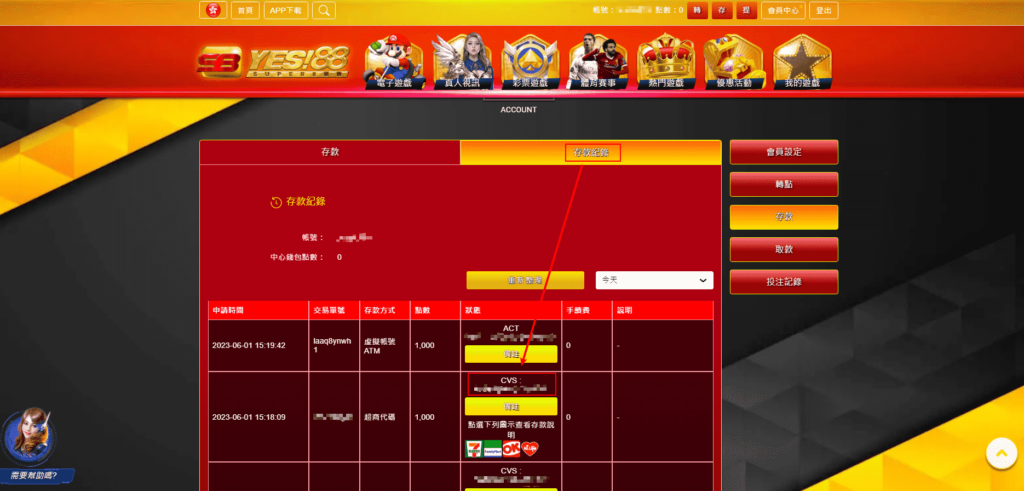

[/av_textblock]
[av_textblock textblock_styling_align=” textblock_styling=” textblock_styling_gap=” textblock_styling_mobile=” size=” av-medium-font-size=” av-small-font-size=” av-mini-font-size=” font_color=” color=” av-desktop-hide=’aviaTBav-desktop-hide’ id=” custom_class=” template_class=” av_uid=’av-lw1ymo9v’ sc_version=’1.0′ admin_preview_bg=”]

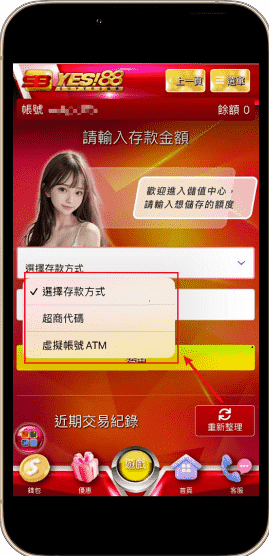
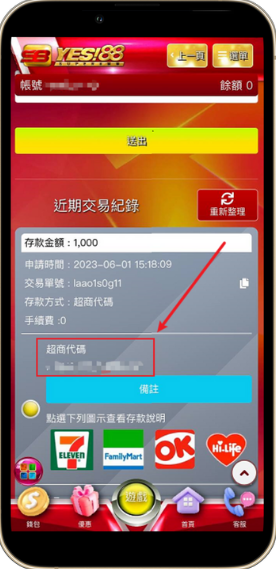
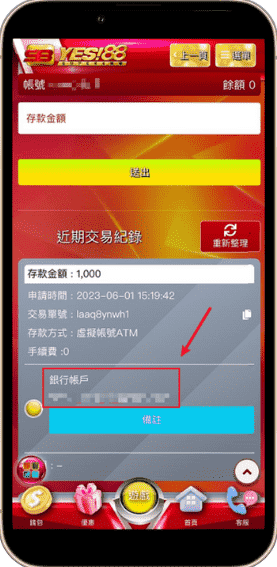
[/av_textblock]
[/av_tab_sub_section][av_tab_sub_section tab_title=’4.綁定銀行’ icon_select=’image_top’ icon=’ue832′ font=’entypo-fontello’ tab_image=’1366′ tab_image_style=” vertical_align=’middle’ color=” background_color=” src=” attachment=” attachment_size=” background_attachment=’scroll’ background_position=’top left’ background_repeat=’no-repeat’ custom_class=” template_class=” av_uid=’av-l1v65jcz’ sc_version=’1.0′]
[av_textblock textblock_styling_align=” textblock_styling=” textblock_styling_gap=” textblock_styling_mobile=” size=” av-medium-font-size=” av-small-font-size=” av-mini-font-size=” font_color=” color=” av-mini-hide=’aviaTBav-mini-hide’ id=” custom_class=” template_class=” av_uid=’av-lw1xlma2′ sc_version=’1.0′ admin_preview_bg=”]
電腦版教學
1.點選右上角會員中心

2.至會員中心,填寫出款帳戶
(再到客服,告知要進行驗證)

[/av_textblock]
[av_textblock textblock_styling_align=” textblock_styling=” textblock_styling_gap=” textblock_styling_mobile=” size=” av-medium-font-size=” av-small-font-size=” av-mini-font-size=” font_color=” color=” av-desktop-hide=’aviaTBav-desktop-hide’ id=” custom_class=” template_class=” av_uid=’av-lw1yqmr4′ sc_version=’1.0′ admin_preview_bg=”]
手機版教學


[/av_textblock]
[/av_tab_sub_section][av_tab_sub_section tab_title=’5.提領現金’ icon_select=’image_top’ icon=’ue832′ font=’entypo-fontello’ tab_image=’1367′ tab_image_style=” vertical_align=’middle’ color=” background_color=” src=” attachment=” attachment_size=” background_attachment=’scroll’ background_position=’top left’ background_repeat=’no-repeat’ custom_class=” template_class=” av_uid=’av-l1v66chu’ sc_version=’1.0′]
[av_textblock textblock_styling_align=” textblock_styling=” textblock_styling_gap=” textblock_styling_mobile=” size=” av-medium-font-size=” av-small-font-size=” av-mini-font-size=” font_color=” color=” av-mini-hide=’aviaTBav-mini-hide’ id=” custom_class=” template_class=” av_uid=’av-lw1xgqwc’ sc_version=’1.0′ admin_preview_bg=”]


[/av_textblock]
[av_textblock textblock_styling_align=” textblock_styling=” textblock_styling_gap=” textblock_styling_mobile=” size=” av-medium-font-size=” av-small-font-size=” av-mini-font-size=” font_color=” color=” av-desktop-hide=’aviaTBav-desktop-hide’ id=” custom_class=” template_class=” av_uid=’av-lw1ys2vw’ sc_version=’1.0′ admin_preview_bg=”]
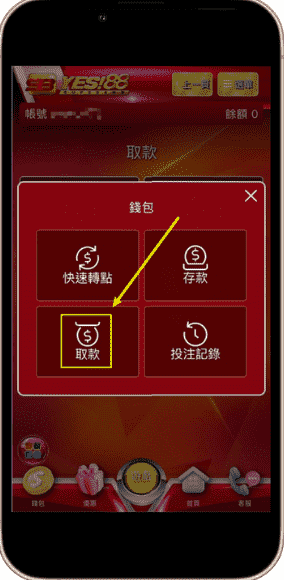
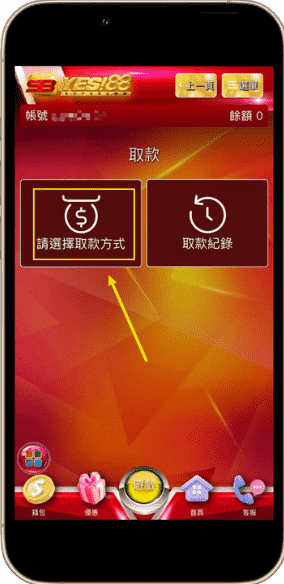
[/av_textblock]
[/av_tab_sub_section][/av_tab_section]